

System Requirements
Supported Processors
Intel & AMD
Supported Graphics Cards
NVIDIA & AMD
Supported OS
Windows 10 & 11 (all builds)
Supported BIOS Mode
UEFI & Legacy
Supported Game Client
All (depending on the game)
Project Type
External (AI)
HWID Spoofer Included
No
Stream Bypass
Yes
Supported AIO/Bundle for Games
Rust / PUBG / Valorant / CS2 (Include FaceIt) / Rainbow Six Siege / Apex Legend / Warzone / Fortnite / Roblox / Arc Raiders
⚠️ No BIOS setup required.
💾 Configs
Auto Configuration - Automatically applies suitable base settings for the selected game. The user can adjust every applied value afterward.
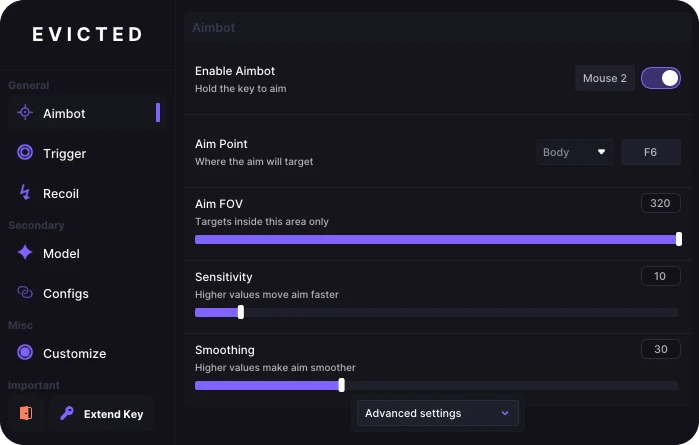
🎯 Aimbot
Enable Aimbot - Enables automatic aiming while the assigned activation key is held.
Advanced Settings - Opens additional controls for detailed aimbot customization.
Aim FOV - Sets the area around the crosshair in which targets can be detected.
Aim Point - Selects the target body area, such as the head or body.
Horizontal Reduction - Reduces the amount of horizontal aiming assistance.
Vertical Reduction - Reduces the amount of vertical aiming assistance.
Humanization - Adds natural variations so aiming movement looks less robotic.
Lead Strength - Controls how far ahead of a moving target the system aims.
Prediction - Predicts target movement and compensates the aiming position.
Reaction Time - Adds a configurable delay before automatic aiming begins.
Sensitivity - Controls how quickly the crosshair moves toward a target.
Smoothing - Makes automatic aiming movement softer and more gradual.
Smooth Type - Selects the acceleration and deceleration style used during aiming.
Target Switch Delay - Adds a pause before switching to another target.
🤖 Model
Model - Selects an AI detection model focused on speed, accuracy or balance.
Target Game - Selects the supported game for the active recognition profile.
Team - Defines which teams or target groups the model should recognize.
Monitor - Selects the display that will be captured and analyzed.
Capture FPS - Controls how many screen frames are analyzed each second.
Confidence - Sets the minimum detection confidence required to accept a target.
FOV - Sets the size of the screen area scanned by the recognition model.
FOV Area - Shows or hides the boundaries of the active detection area.
Body Dot - Adjusts the body reference point used for recognition or aiming.
Mouse Input - Selects the method used to send movement commands to the mouse.
Mini Overlay - Shows or hides a compact overlay with essential information.
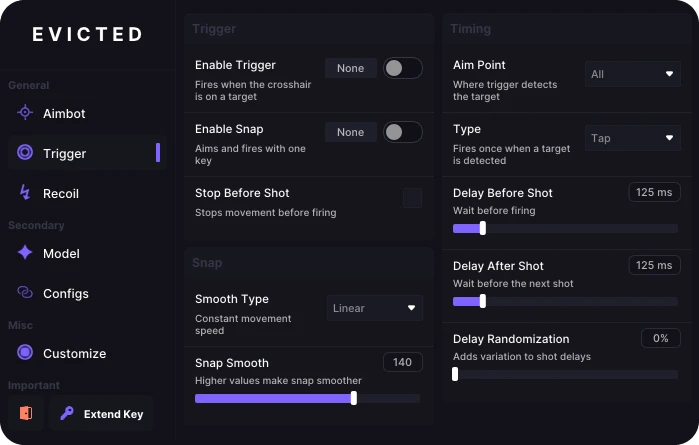
⚡ Triggerbot
Enable Trigger - Automatically fires when a valid target reaches the crosshair.
Enable Snap - Quickly moves the crosshair to a target before firing.
Aim Point - Selects the body area that must be detected before firing.
Delay Before Shot - Adds a configurable pause before the trigger fires.
Delay After Shot - Sets the waiting time before another automatic shot.
Delay Randomization - Varies firing delays to avoid identical timing patterns.
Stop Before Shot - Stops character movement before firing to improve accuracy.
Snap Smooth - Controls the speed and smoothness of snap aiming.
Smooth Type - Selects how the crosshair accelerates during snap aiming.
Type - Selects the operating mode used by the automatic firing system.
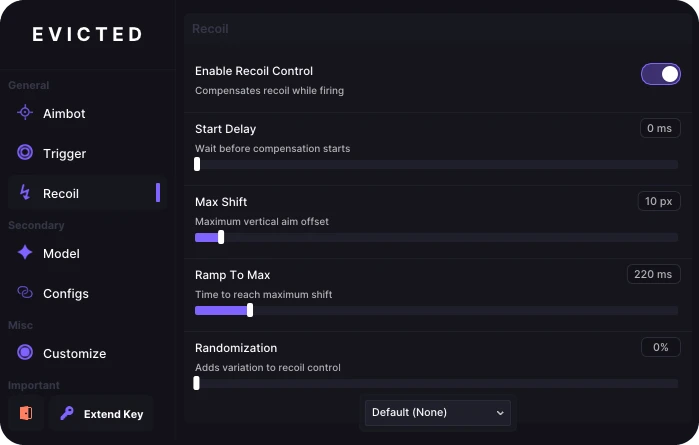
🔫 Recoil Control
Enable Recoil Control - Compensates for vertical and horizontal weapon recoil.
Max Shift - Limits the maximum crosshair movement used for compensation.
Ramp To Max - Controls how quickly recoil compensation reaches full strength.
Randomization - Adds small variations to recoil-control movement.
Recoil Preset - Selects a saved recoil profile for a specific weapon.
Start Delay - Sets the delay before recoil compensation begins.
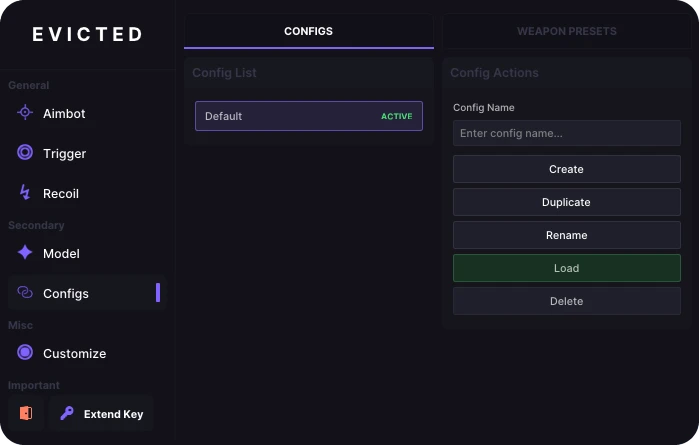
💾 Configs
Config List - Displays all saved configuration profiles.
Config Name - Provides a field for naming a new configuration.
Create Config - Creates a new configuration profile.
Load Config - Applies all settings stored in the selected configuration.
Rename Config - Changes the name of the selected configuration.
Duplicate Config - Creates a copy of a configuration with all its settings.
Delete Config - Permanently deletes the selected configuration.
🔫 Weapon Presets
Activation Key - Assigns a key that activates the selected weapon preset.
New Preset - Provides a field for naming a new weapon preset.
Create Preset - Creates a new weapon-specific settings profile.
Duplicate Preset - Copies the selected preset with all its settings.
Delete Preset - Permanently deletes the selected weapon preset.
CS2 Presets - Displays saved weapon presets created for CS2.
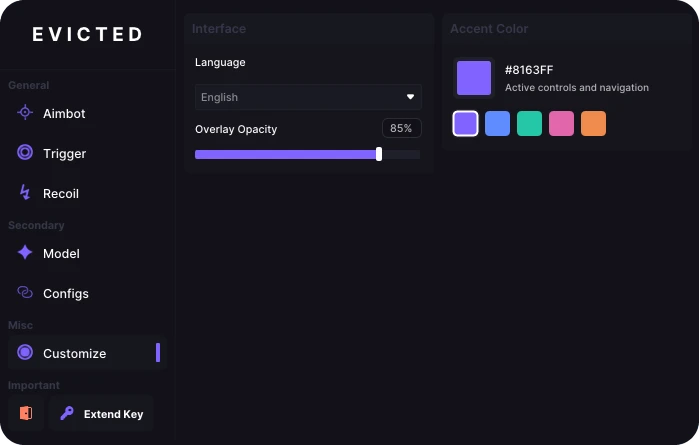
⚙️ Customization
Accent Color - Changes the color of active controls and navigation elements.
Accent Color Presets - Provides ready-made interface color options.
Custom Accent Color - Allows a custom interface color to be entered manually.
Overlay Opacity - Controls how transparent or visible the overlay appears.
Language - Changes the application interface language.
* The functionality of the program can be changed at any time at the discretion of the developer. We strive to reflect the latest available features.
A powerful and reliable Multi AI (Aimbot) product developed by Evicted Projects.
One subscription includes all (9 supported games):
- Rust
- PUBG
- Valorant
- CS2 (Include FaceIT)
- Rainbow Six Siege
- Apex Legends
- Warzone
- Fortnite
- Roblox
- Arc Raiders
Hi, it's me.
06 Nov 2026
Verified Purchase
Automatic feedback after 7 days
Hi, it's me.
29 Oct 2026
Verified Purchase
jos
IndoHax Response
thank you for the feedback
mynameis
12 Sep 2026
Verified Purchase
Recomended bgt nh, CS nya selalu respon dan yang pasti terpercaya
VALORANT
EVICTED : MULTI AI (AIMBOT)
Undetected
Last updated:
—